
How To Apply Online Registration For TIN Number
Getting a Tax Identification Number (TIN) is now a major requirement for individuals, businesses, freelancers, and companies operating in Nigeria. Without a valid TIN, you may face difficulties opening a corporate bank account, paying taxes, registering a business, or carrying out important financial transactions.
In this beginner-friendly guide, you’ll learn how to apply for TIN number online in Nigeria step by step, including the registration requirements, documents needed, and how to complete the process through the official tax platforms. Whether you’re a small business owner, entrepreneur, or employee, this article will help you get your TIN quickly, avoid common mistakes, and stay compliant with Nigerian tax regulations in 2026.
What Is A TIN Number?
A Tax Identification Number (TIN) is a unique number issued to individuals and businesses for tax purposes. It is used by the tax authorities to identify taxpayers and track tax payments.
In Nigeria, TIN is issued through the tax system managed by the Joint Tax Board (JTB) in collaboration with the Federal Inland Revenue Service (FIRS) and state tax agencies.
Think of it as your official tax identity.
Why You Need A TIN In Nigeria
Getting a TIN is not just for big companies. It is important for many everyday financial and business activities.
Here are key reasons you need it:
To Open A Corporate Bank Account
Most banks in Nigeria will not open a business account without a TIN.
For Business Registration
If you are registering a business name or company, TIN is required.
For Government Contracts
You need a TIN to bid for contracts from government agencies.
For Tax Compliance
It helps tax authorities track your tax obligations properly.
For Import And Export Business
Customs require TIN for clearing goods.
Who Can Apply For TIN?
You can apply for a TIN if you are:
- A business owner (registered or unregistered)
- A company or corporate organization
- A self-employed individual
- A freelancer or contractor earning taxable income
- An NGO or association
Requirements For TIN Registration Online
Before applying, make sure you have the following:
For Individuals:
- National Identification Number (NIN)
- Full name and date of birth
- Phone number and email address
- Residential address
For Businesses:
- Business registration details (if available from CAC)
- Business name and nature of business
- Owner’s personal details (NIN, phone, address)
- Valid email and phone number
How To Apply Online Registration For TIN Number (Step-by-Step)
Here is a simple breakdown of the process.
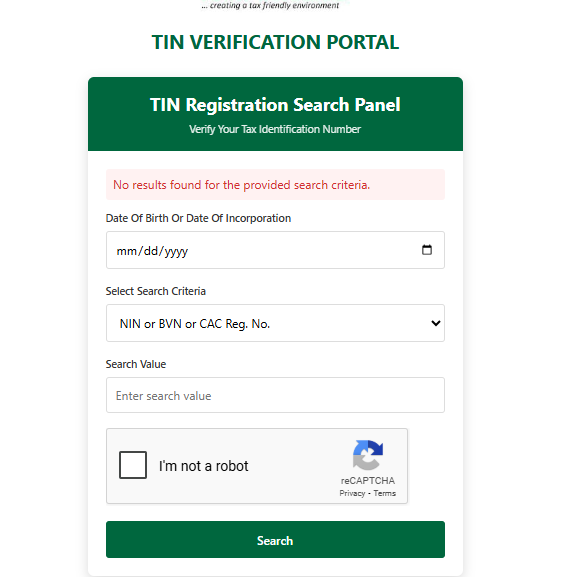
Step 1: Visit The Official TIN Registration Portal
Go to the official Joint Tax Board TIN registration platform or your state Internal Revenue Service portal.
This is the system used nationwide for TIN issuance.
Step 2: Choose Your Category
Select whether you are:
- Individual
- Business Name
- Company
- Association or NGO
Choosing the correct category is very important because it determines the information you will provide.
Step 3: Fill In Your Personal Or Business Information
You will be required to enter:
- Full name or business name
- Date of birth (for individuals)
- Phone number and email
- Address details
- National Identification Number (NIN)
Make sure all details are correct to avoid delays.
Step 4: Upload Required Details
Some portals may require you to confirm or upload supporting details such as:
- NIN slip or BVN verification
- CAC certificate (for registered businesses)
- Utility bill for address verification
Step 5: Review Your Application
Before submitting, carefully review all information. Mistakes in name spelling or number entry can delay your approval.
Step 6: Submit Your Application
Click submit and wait for processing. In many cases, your TIN is generated instantly or within a short time.
Step 7: Receive Your TIN Number
Once approved, your TIN will be:
- Sent to your email or phone
- Available for download on the portal
You can then print it out and use it for official purposes.
How Long Does TIN Registration Take?
In most cases, online TIN registration in Nigeria is:
- Instant or same day for individuals
- 1–3 working days for business verification cases
Delays may occur if your details are incorrect or need manual review.
Common Problems During TIN Registration (And Solutions)
Mismatch In NIN Details
If your name or date of birth does not match your NIN, your application may be rejected.
- Solution: Ensure your NIN details are correct before applying.
Website Not Loading
Sometimes the tax portal may be slow or unavailable.
- Solution: Try again during off-peak hours or use a stable internet connection.
Email Not Receiving TIN
Your TIN may be generated but not delivered.
- Solution: Check spam folder or log into the portal directly.
Incorrect Business Information
Wrong business details can delay approval.
- Solution: Double-check CAC or registration data before submission.
Is TIN Free In Nigeria?
Yes, applying for a TIN is generally free of charge when done through official government portals. Be careful of third-party agents who may charge unnecessary fees.
Importance Of Using Official Channels
Always use official tax portals managed under the Joint Tax Board (JTB) or state tax authorities to avoid:
- Fraud
- Identity theft
- Fake TIN numbers